3D Eagle Laser Engrave File PNG for Premium Projects
When it comes to laser engraving, the right design assets can elevate your work from ordinary to extraordinary. The 3D Eagle Laser Engrave File PNG is a standout choice for creators who want bold, dimensional art that captures attention and adds a touch of professionalism to their projects. This collection features a powerful eagle motif rendered in high-resolution 3D style, making it ideal for wood, acrylic, leather, and more.
What Makes This Design Unique?
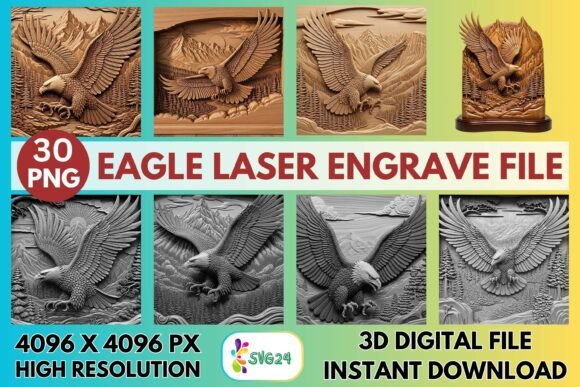
The 3D Eagle Laser Engrave File PNG is more than just an image—it's a statement. With its sharp detailing and rich depth, this artwork brings a sense of strength and majesty to any surface. The layered effect mimics traditional carving techniques but with the precision only digital tools can offer. Whether you're creating a patriotic wall hanging or a custom trophy, this design conveys power and elegance effortlessly.
Each file is crafted to maintain clarity at large sizes, thanks to the 4096×4096 px resolution. The non-transparent backgrounds ensure clean engravings without unwanted shadows or halftones. You'll find two distinct sets within the package: one with vibrant coloring options and another in grayscale. These variations allow you to adapt the design to different materials and project needs, whether you're looking to add color or focus on texture and contrast.
Visual Characteristics That Make It Stand Out
- Sharp Detailing: Every feather, wing, and eye is precisely rendered to highlight the eagle’s form.
- Bold Shadows: The 3D effect gives the illusion of depth, making the engraving pop off the surface.
- High-Resolution Clarity: Ensures crisp lines and smooth gradients even when engraved at full scale.
- Non-Transparent Backgrounds: Simplifies alignment and ensures consistent results across various surfaces.
Where Can You Use the 3D Eagle Laser Engrave File PNG?
This design excels in both personal and commercial applications. Its strong visual identity makes it suitable for branding, while its versatility supports everything from home décor to signage. Here are some of the best ways to use it:
Home Décor and Wall Art
Engraving an eagle into wooden panels or acrylic sheets creates stunning wall art. The dimensionality of the design works especially well on natural wood grains, where the light catches the varying depths of the engraving. For a modern twist, try using it on black acrylic for a dramatic silhouette effect.
Patriotic and Wildlife-Themed Projects
The eagle is a symbol of freedom and national pride, so it naturally fits into projects like American-themed gifts, Fourth of July decorations, or wildlife-inspired merchandise. Pair it with simple text in a complementary typeface, such as a classic serif for a vintage look or a sleek sans-serif for a contemporary feel.
Custom Plaques and Trophies
Whether you’re crafting personalized plaques for clients or designing awards for events, the 3D Eagle Laser Engrave File PNG adds a level of sophistication. The grayscale version is particularly effective for metal or dark woods, where subtle tonal shifts create a polished, professional finish.
Signage and Branding Materials
For businesses focusing on themes like nature, adventure, or leadership, the eagle design can be a central part of your brand identity. It looks great on signage, business cards, and promotional items. When used consistently, it helps reinforce your message and build recognition over time.
Gifts and Merchandise
Customized products like engraved mugs, keychains, or cutting boards become premium gifts with the addition of this design. The eagle motif is timeless and appeals to a wide audience, making it a safe yet impactful choice for product customization.
Design Considerations and Recommendations
While the 3D Eagle Laser Engrave File PNG is ready-to-print and optimized for laser machines like Glowforge, LightBurn, xTool, Sculpfun, OmTech, and CO2 systems, there are a few things to keep in mind to maximize its potential:
- Material Choice: Light-colored woods like maple or birch show the full vibrancy of the colored PNGs. Darker woods or metals respond better to grayscale files due to the way they absorb and reflect light.
- Laser Settings: For Glowforge users, start with Speed 1000 and Power 90 for grayscale files. Adjust based on the material and desired depth. Grayscale settings should vary according to density, while Max Quality mode and LPI 270 help preserve fine details.
- Software Compatibility: If you're using LightBurn, applying the Jarvis dither filter can enhance the engraving outcome, especially when working with grayscale images.
- Resizing: Although the PNG files are high-res, resizing may affect quality. Always test at your intended scale before committing to a full run.
One of the most valuable aspects of this set is the variety it offers. With 15 colored and 15 grayscale versions, you can experiment with different looks and decide which best suits your aesthetic or client preferences. For instance, a grayscale engraving might feel more elegant on a walnut plaque, while a colored version could bring life to a pine cutting board.
How to Choose the Right Version for Your Project
Selecting between color and grayscale depends largely on the medium and purpose. If you're engraving onto something that will be painted or stained afterward, the grayscale option provides a clean base that won’t interfere with finishes. On the other hand, if you plan to use the design as-is—especially on light-colored materials—the colored PNGs deliver a striking visual impact.
Also consider the emotional tone you want to convey. A colored eagle might feel more dynamic and celebratory, while a grayscale design leans toward minimalism and maturity. Both have their place, and the included styles give you the flexibility to match the right mood for your audience.
Real-World Applications and Creative Possibilities
Let’s explore how real designers and makers have applied the 3D Eagle Laser Engrave File PNG in their work:
- A local shop owner used the grayscale version to engrave a series of customer appreciation plaques. The result was a cohesive look that felt both professional and heartfelt.
- A content creator incorporated the colored PNG into a set of engraved wooden bookmarks for a nature-themed blog. The bright feathers added a unique flair that stood out in photos and social media posts.
- A small business designed a line of engraved phone cases using the eagle motif. They paired it with a modern sans-serif font for product titles, creating a balanced and stylish layout.
These examples illustrate the range of creative possibilities. The key is to let the design speak for itself while ensuring the surrounding elements complement it. Avoid overcrowding the space around the eagle; give it room to breathe and dominate the visual narrative.
Commercial Licensing and Professional Use
If you're planning to use these files in a commercial context—such as selling engraved products or including them in marketing materials—make sure to review the licensing terms. Since this is a digital asset, not a layered SVG or cut file, it's essential to confirm whether it allows for resale or mass production. Many designers choose to pair this file with a commercial font to maintain legal compliance and professional integrity.
For those building a brand identity, consider how the eagle design aligns with your overall logo design and packaging design. It can serve as a secondary graphic element that reinforces your main visuals without overshadowing them. Think about using it subtly in corner accents or as a background pattern for textured effects.
Maximizing Impact Through Readability and Hierarchy
In editorial or web design contexts, the 3D Eagle Laser Engrave File PNG can act as a focal point rather than a typographic element. However, when pairing it with text, readability is crucial. If you're adding a title beneath the engraving, avoid using overly decorative or script fonts that might clash. Instead, go for a premium font with good legibility, such as a modern sans-serif or a refined serif typeface.
Use the eagle design to establish a clear visual hierarchy. Place it prominently to draw attention, then layer supporting text or graphics around it. This approach helps guide the viewer’s eye and enhances the storytelling aspect of your design. In packaging, for example, the eagle could signal quality and durability—perfect for outdoor gear or luxury items.
Practical Tips for Font Pairing and Layout
Here are some quick tips to help you integrate the 3D Eagle Laser Engrave File PNG effectively:
- Font Pairing: Match the eagle’s strength with a bold, readable font. For a rustic feel, try a slab serif; for a clean, contemporary vibe, a geometric sans-serif works well.
- Spacing: Give the design enough white space to stand out. Overloading the page can dilute its impact.
- Color Contrast: If using the colored PNG, ensure the background doesn't compete with the hues. Neutral tones often yield the best results.
- Testing: Before engraving multiple pieces, do a trial run on a scrap material to see how the design translates in person. Lighting and angle can change the perceived depth and detail.
By treating the eagle design as a core design asset, you open up new avenues for creativity. It’s not just about what the tool does—it’s about how you use it to tell a story, evoke emotion, and connect with your audience.
Final Thoughts on Elevating Your Engraving Projects
The 3D Eagle Laser Engrave File PNG isn’t just another engraving file—it’s a versatile, high-quality resource that empowers makers to create meaningful, visually compelling projects. From custom gifts to branded signage, it delivers the kind of craftsmanship that turns heads and builds trust.
As with any creative font or design element, the secret lies in thoughtful application. Let the eagle’s form and symbolism support your message, and don’t hesitate to experiment with different materials and layouts. Whether you're a hobbyist looking to expand your skills or a business owner aiming to boost your brand identity, this design set is a solid investment in your creative toolkit.
So take a moment to evaluate how this engraving file might fit into your next project. Test it out, explore the included styles, and remember—great design is about making intentional choices that resonate with your audience.